

Download AutoRefresher for IE – Internet Explorer, auto refresh, page refresh, dynamic content, auction monitoring, web monitoring tool, browser add-on, automated refresh, IE add-on, web page refresh
Overview
AutoRefresher for IE is a specialized browser add-on designed for users of Internet Explorer who require consistent and automated updates of web pages. Its primary purpose is to eliminate the need for manual refreshes by automatically reloading the current page at user-defined intervals. This functionality is particularly useful for individuals monitoring fast-changing content such as online auction sites, stock tickers, news feeds, or event countdowns. By maintaining real-time visibility without user intervention, the tool enhances efficiency and reduces the risk of missing critical updates.
The app targets users who rely on dynamic web content and need a reliable method to stay informed. This includes auction participants, event organizers, traders, and researchers tracking live data. While the developer did not provide additional background information, the tool’s focused functionality suggests a niche but practical solution for a specific user group. In the broader app ecosystem, AutoRefresher for IE fills a gap left by modern browsers that no longer support legacy extensions, offering a dedicated utility for users still operating on older Windows environments.
Real-world use cases include monitoring eBay-style auctions, tracking ticket availability, or following live sports scores. The tool’s minimal footprint and straightforward design emphasize utility over complexity. Despite the declining relevance of Internet Explorer, this add-on remains a relevant solution for users who have not transitioned to newer platforms. Its continued existence underscores the ongoing need for lightweight, task-specific tools in specialized digital workflows.
Key Features & Functionality
- Automated Page Refreshing – The core functionality allows the current web page to refresh automatically at intervals selected by the user. This eliminates the need for repetitive manual clicks, preserving user focus and reducing fatigue during prolonged monitoring sessions.
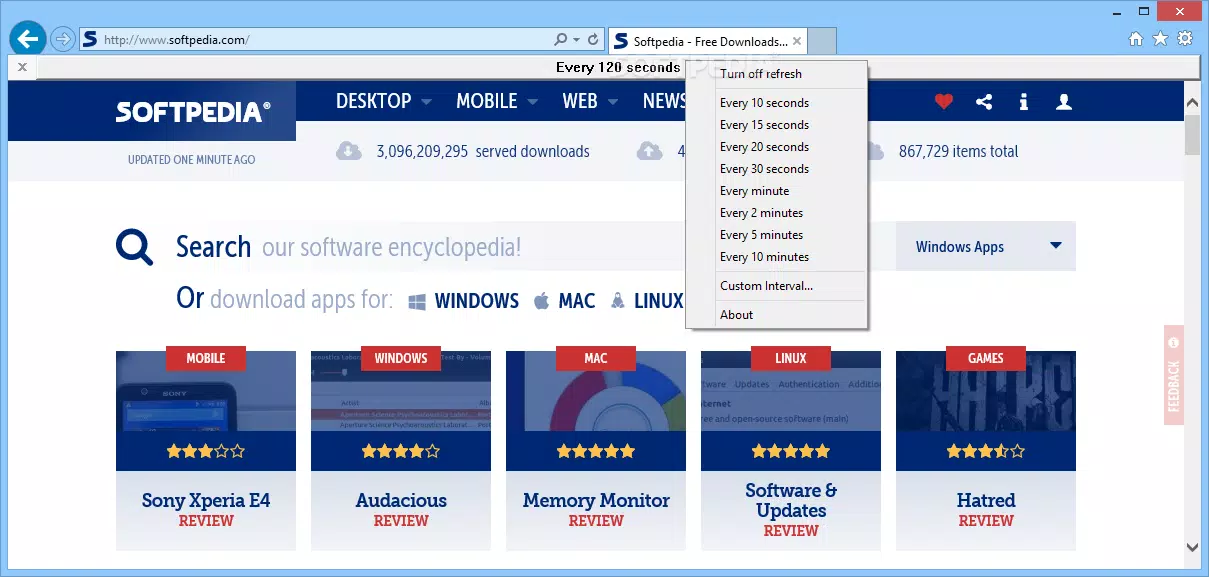
- Simple Toolbar Interface – A streamlined toolbar presents a single button that opens a dropdown menu with preset refresh intervals, including 10 seconds, 30 seconds, 1 minute, 5 minutes, and 10 minutes. This design prioritizes accessibility and ease of use, especially for non-technical users.
- Customizable Refresh Intervals – Users can input custom time values to suit unique monitoring needs. This flexibility enables precise control over refresh frequency, allowing for tailored performance based on content volatility or network conditions.
- Efficient Tool for Dynamic Web Content – Specifically engineered for users engaged with rapidly changing web pages, this add-on ensures that content remains current without requiring constant attention. It is particularly effective for time-sensitive tasks such as bidding in online auctions or tracking live event updates.
For example, a user monitoring a high-demand ticket release can set a 5-second refresh interval to catch the moment a new batch becomes available. Similarly, someone tracking a live auction can use a 10-second cycle to ensure they are always viewing the latest bid. These practical applications highlight the tool’s value in real-world scenarios where timing is critical.
Interface, UX & Performance
The user interface of AutoRefresher for IE is intentionally minimal, focusing on core functionality without distractions. The toolbar integration is unobtrusive, placing the refresh control within easy reach of the browser’s main navigation. The visual design aligns with the aesthetics of older Internet Explorer add-ons, featuring simple icons and text-based controls that are easy to recognize and operate.
Navigating the tool is straightforward: users click the toolbar button, select an interval from the dropdown, or enter a custom value. There are no complex settings or layered menus, which enhances usability for users who prioritize speed and simplicity. The tool operates in the background, requiring no ongoing interaction once configured.
Although the developer did not list formal performance metrics, the app’s small file size of 1.2 MB suggests low resource consumption. It is designed to run efficiently on older Windows systems without impacting browser performance. Responsiveness is expected to be high, given the limited scope of its operations. Stability is likely maintained through consistent behavior during long monitoring sessions, though specific crash reports or error logs were not provided.
Platform Compatibility & Technical Requirements
AutoRefresher for IE is designed exclusively for the Windows platform and is compatible with Internet Explorer. The application is distributed as a browser add-on and does not require installation beyond the standard process for IE extensions. The file size is 1.2 MB, making it lightweight and quick to download.
Specific requirements such as minimum OS version, processor specifications, or RAM were not listed by the developer. Compatibility information was not fully disclosed, so users should ensure their system meets the baseline requirements for running Internet Explorer. The software version is 1.0, indicating a stable initial release. As the app is free, there are no financial barriers to entry, making it accessible for users seeking a no-cost solution.
Pros and Cons
Pros
- Free to download and use with no hidden costs
- Lightweight at only 1.2 MB, minimizing system impact
- Simple, intuitive toolbar interface suitable for non-technical users
- Customizable refresh intervals for tailored monitoring needs
- Specifically optimized for Internet Explorer users
Cons
- Exclusive to Internet Explorer, limiting compatibility with modern browsers
- Developer did not provide detailed system requirements
- No information on update frequency or long-term maintenance
- Not available for mobile platforms or newer operating systems
- Limited to a single function, with no additional features or integrations
FAQ
Is AutoRefresher for IE safe to install?
Yes, the app is free and distributed through trusted channels. As a lightweight browser add-on with no known malware signatures, it poses minimal security risk when downloaded from official sources.
Can I use AutoRefresher for IE on modern Windows versions?
Compatibility depends on whether Internet Explorer is still supported on the system. While the app may run on Windows 10 and 11, its functionality is limited to environments where IE is available.
Does AutoRefresher for IE work on mobile devices?
No, the tool is designed exclusively for desktop use with Internet Explorer on Windows and is not available for Android or iOS devices.
How often can I update the refresh interval?
Users can set any interval between 10 seconds and 10 minutes using preset options, or enter a custom value for precise timing control.
Is there a mobile version or alternative for newer browsers?
There is no indication of a mobile version or support for modern browsers like Chrome, Firefox, or Edge. Users seeking similar functionality may need to explore alternative tools or browser extensions designed for current platforms.
Final Thoughts
AutoRefresher for IE remains a practical and focused tool for users who depend on Internet Explorer and require automated page refreshing. Its minimalist design, ease of use, and customizable intervals make it a reliable choice for monitoring dynamic web content such as auctions or live updates. While its compatibility is limited to a legacy browser, it serves a specific need with precision and efficiency.
For individuals still operating in older Windows environments or those who rely on IE-specific workflows, this add-on offers tangible value without unnecessary complexity. Its free model and small footprint further enhance its appeal as a no-frills utility. Despite the broader shift toward modern browsers, the tool continues to provide a niche but essential service.
Download AutoRefresher for IE now


